Realtime Blackhole Lists (RBLs / DNSBLs)
Realtime Blackhole Lists (also known as DNSBLs or RBLs) are queryable DNS databases that publish IP addresses known for sending spam, operating open relays, or exhibiting compromised behavior. Citadel checks incoming SMTP connections against your configured DNSBLs in real time, rejecting spam connections before they consume server bandwidth or storage.
Configuring RBLs in WebCit
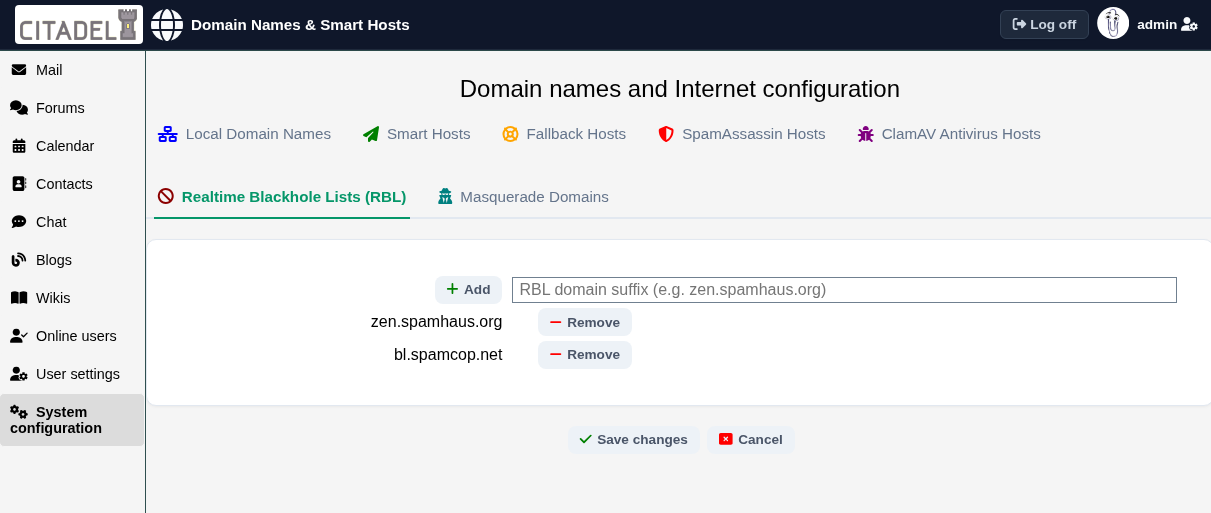
To configure DNSBL providers for your Citadel server:
- Navigate to System configuration → General → Domain names and Internet configuration.
- Select the Realtime Blackhole Lists (RBL) tab.
- Enter the RBL domain suffix (such as
zen.spamhaus.orgorbl.spamcop.net) in the input box and click Add. - Click Save changes to apply.
Popular and Active DNSBL Providers
Here are reliable, actively maintained DNSBL services commonly used by Citadel administrators:
- zen.spamhaus.org: The Spamhaus ZEN list combines multiple databases (SBL, CSS, XBL, and PBL) covering known spammers, exploits, and dynamic IP blocks. Note that queries from high-volume sites or public DNS resolvers require a free Spamhaus Data Query Service (DQS) key.
- bl.spamcop.net: SpamCop lists IP addresses that have received complaints from SpamCop reporting members. It automatically expires listings quickly as spam activity ceases.
- b.barracudacentral.org: The Barracuda Reputation Block List (BRBL) is a free, highly accurate IP reputation list (requires a quick one-time free account registration).
- psbl.surriel.com: The Passive Spam Block List (PSBL) is an easy-on, easy-off list designed to minimize false positives by focusing on confirmed spam traps.
- dnsbl.dronebl.org: DroneBL tracks compromised hosts, open relays, and infected botnet devices.
- ix.dnsbl.manitu.net: NiX Spam is an active, European-based blocklist with rapid automated detection.
Defunct Lists to Avoid
Older guides frequently reference DNSBL providers that have ceased operations. Do not configure the following lists, as defunct DNSBLs may either fail or begin returning wildcard positive responses that reject all incoming email:
dnsbl.sorbs.net(SORBS permanently shut down in 2024)dnsbl.njabl.org(NJABL shut down in 2013)cbl.abuseat.org(merged into Spamhaus ZEN)rfc-ignorant.org(shut down in 2014)
Checking Your Server's IP Reputation
To verify that your own mail server's public IP address is not inadvertently listed on any major blacklists, you can query diagnostic services such as MXToolbox Blacklist Check or MultiRBL.