How do I configure automatic message expiry?
While mail systems typically retain messages indefinitely, you may wish to automatically purge old items from high-volume rooms, RSS feeds, discussion forums, or mailboxes to manage storage growth and eliminate clutter.
Citadel features a built-in automated purger that evaluates rooms daily and purges old messages according to your retention policies.
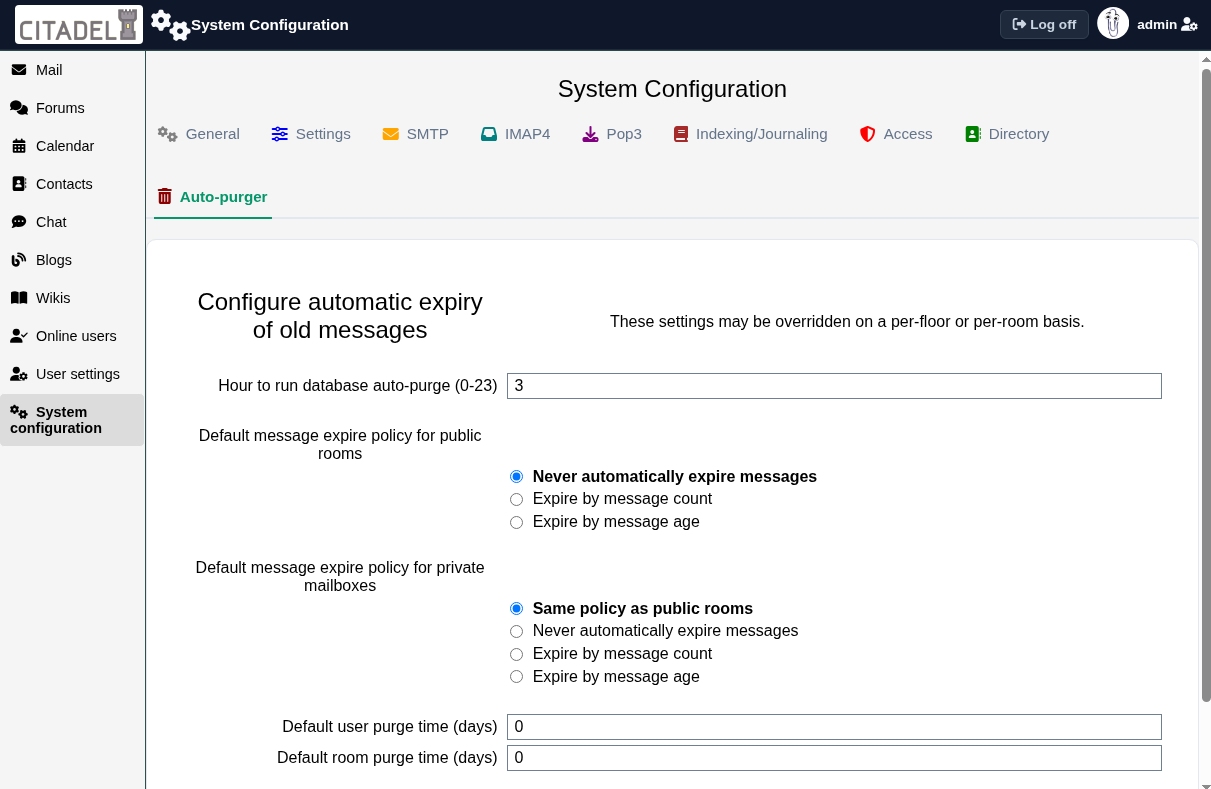
Configuring System-Wide Expiry in WebCit
To configure global message expiry policies:
- Click System Configuration in the sidebar.
- Select the Auto-purger tab.
- Configure the hour of the day (0 to 23) when the database auto-purge job should run.
- Set the default expiry policy for public rooms and private mailboxes. You can choose:
- Never automatically expire messages: Retains all messages permanently.
- Expire by message count: Keeps only the most recent N messages, deleting older ones.
- Expire by message age: Deletes messages older than a specified number of days.
- Click Save changes to apply.
Overriding Expiry Policies Per Floor or Per Room
System-wide defaults provide a baseline for your site, but you can tailor retention policies with granular control:
- Floor Policy: You can define an expiry policy for an entire floor, which applies to all rooms located on that floor.
- Room Policy: Individual rooms can override both the floor policy and the system default. When editing room settings, navigate to the message expire policy option to specify custom retention limits for that specific room.